


How Many Charging module Ports Does a Modern Conference Table Actually Need?
A modern conference table is no longer just a surface for documents and laptops. During a two-hour meeting, attendees expect to keep phones charged, connect peripherals, and occasionally top up a laptop without leaving the table. That expectation puts the charging module decision at the center of most modern conference room designs. But how many ports does a modern conference table actually need — and how do you size a meeting table socket module without over- or under-building?
This guide walks through the practical sizing logic used by furniture OEMs, interior contractors, and specifiers. It covers port count, port type, wattage, placement, and the common mistakes that turn a well-intentioned conference table power solution into a frustrating user experience.
A practical starting point is 1 to 2 charging ports per seat, adjusted for meeting length and device mix.
For most corporate meeting rooms, a USB-C dominant mix with one or two USB-A ports remains the safest choice through 2026.
Wattage is as important as port count: phones need around 20 W, while laptops need 45–65 W from a single port.
Table size, seating capacity, and whether the table supports laptops vs. phones drive the final module count.
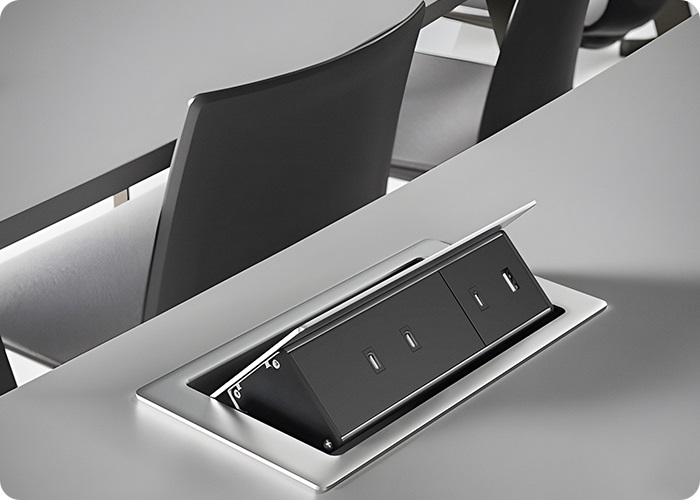
Certified, thermally protected usb charging module hardware reduces long-term failure risk in embedded furniture installations.
Why Port Count Matters in Modern Conference Rooms
Conference room usage patterns have shifted. Attendees increasingly bring at least one charged device — often a phone plus a laptop — and expect charging to be available at the seat, not at a wall outlet across the room. Under-provisioning means users stretch cables, crowd around a single outlet, or skip charging entirely. Over-provisioning adds cost, weakens the table's structural integrity with extra cutouts, and may push the connected load beyond a practical circuit.
Sizing a conference table power solution is therefore a balancing act between three factors: how many people sit at the table, what those people charge, and how the chosen module performs when multiple devices draw power at once.
The Standard Rule: Ports Per Seat
The 1-to-2-Port Rule
Industry practice for corporate meeting rooms converges on a simple rule: plan for one to two ports per seat. For rooms where attendees mostly charge phones and occasional tablets, one port per seat is usually sufficient. For longer meetings, training rooms, or tables that also host laptop-heavy working sessions, two ports per seat is the safer baseline.
This rule is not a code requirement; it is a sizing heuristic based on observed usage. A well-designed module uses intelligent power allocation, so a two- or three-port module does not double the wall load — it shares a fixed power budget across connected devices.
How Table Size Changes the Calculation
As table size grows, the per-seat rule is adjusted for geometry. A small huddle table may need only one module in the center; a 12-seat boardroom table may require two or three modules distributed along the edge so that no seat is more than arm's length from a port.
| Table seating | Recommended ports | Suggested module layout | Typical use case |
|---|---|---|---|
| 4–6 seats | 4–8 ports | 1 module, centered | Huddle room, small meeting |
| 8–10 seats | 8–14 ports | 1–2 modules, centered or paired | Standard corporate meeting room |
| 12–16 seats | 14–24 ports | 2–3 modules, evenly spaced along the table edge | Boardroom, training room |
| 16+ seats | 24+ ports | 3+ modules, consider mixed USB and AC outlets | Large boardroom, event space |
Port Type Mix: USB-C, USB-A, and AC Sockets
USB-C vs. USB-A in 2026
USB-C is now the dominant charging interface for new laptops, tablets, and phones, and USB-IF specifications define the Type-C connector and power delivery standard. However, a meaningful share of older devices — and many accessories such as shared meeting-room cameras, lights, and small peripherals — still use USB-A. For this reason, most mature conference table power solutions specify a USB-C plus USB-A combination rather than USB-C alone.
A common and practical mix is one USB-C port plus one USB-A port per module position. This covers the widest range of devices without forcing users to carry adapters.
When to Add AC Power Sockets
Not every device charges over USB. Laptops with barrels or magnetic connectors, multi-brand docking stations, and larger equipment may require a direct AC socket. In tables designed for presentations, training, or longer working sessions, mixing a USB charging module with one or two AC outlets in the same table is often the most robust choice. A meeting table socket module that combines USB and AC output in a single cutout simplifies both sourcing and installation.
| Port type | Best for | Recommended in conference tables |
|---|---|---|
| USB-C PD | Phones, modern laptops, tablets | Include in every module position |
| USB-A | Older phones, accessories, shared peripherals | Include at least one per module |
| AC outlet | Laptops with barrel chargers, docking stations, presentation gear | Add on tables for working or presentation use |
| Wireless charging pad | Occasional, accessory-only use | Optional; do not rely on it as the primary port |
Wattage and Power Budget
Matching Wattage to the Device
Port count alone does not determine charging experience. A 20 W port charges a phone at a usable speed but charges a laptop slowly or not at all. A 45–65 W port, by contrast, handles most thin-and-light laptops through USB Power Delivery. When specifying such hardware for conference use, the higher wattage usually justifies itself if the table is used for working sessions.
Shared Power Budget Across Multiple Ports
Modern multi-port modules do not multiply output by the number of ports. Instead, they use intelligent power allocation: the total wattage is shared automatically. A 65 W module with two ports may deliver up to 65 W to one device, or split 30 W/18 W when two devices are connected. This behavior is normal and should be understood at the spec stage rather than treated as a defect.
| Typical module total wattage | Best suited for | Relevant meeting room type |
|---|---|---|
| 20 W | Phones and small accessories only | Brief internal meetings, small huddle rooms |
| 45 W | Phones plus thin-and-light laptops | Standard corporate meeting rooms |
| 65 W | Full laptop charging, multi-device use | Working sessions, training rooms |
| 100 W+ | High-power laptops, multi-device desks | Executive boards, productive worktables |
Module Placement and Table Layout
Even a correctly sized module performs poorly if it is hard to reach. Practical placement rules include:
Position modules along the table edge or inside grommets, so every seat is within easy arm's reach.
For long tables, space modules roughly every 0.8–1.2 meters rather than clustering them in the center.
Keep cable routing clear: the module should feed into a cable tray, trunking channel, or integrated table cavity rather than hanging loosely.
Avoid placing modules where they interfere with laptop placement or paper space.
When these rules are followed, the conference table power solution disappears into the furniture: users notice it only because charging simply works.
Cable Routing and Table Cavity Design
The module itself is only half the installation. The way cables leave the table determines whether users experience a clean, professional product or a tangle of cords beneath the surface. In commercial furniture projects, the table cavity, grommet, and cable tray should be designed in the same 3D model as the cutout itself.
Three routing rules consistently produce better results. First, route the incoming mains or low-voltage cable through a dedicated channel inside the table leg or modesty panel, not across the floor. Second, leave enough slack at the module terminals so the cable can bend naturally rather than being pulled tight against the connector. Third, group USB charging cables away from power cables where possible, to avoid unnecessary coupling noise. A conference table power solution that looks tidy on top but has unruly wiring underneath will still generate service calls within the first year.
For retrofit projects, surface-fit modules and clip-on trunking channels avoid the need to disassemble the table, but they require careful measurement of the available cavity depth before ordering.
Future-Proofing for the Next Device Cycle
Conference tables are bought once and expected to last five to ten years. Device standards evolve inside that window. Two practical choices reduce the risk of obsolescence: specify a usb charging module with a USB-C port rated for at least 45 W now, and choose a module that supports multiple charging protocols rather than a single fixed standard. A module that negotiates the device's preferred protocol automatically keeps working as new phone and laptop models enter the market, while a fixed-voltage module may slowly become incompatible.
It is also worth reserving one or two spare cutout positions in the table design, even if they are blanked off at launch. Adding a data port, a wireless charging pad, or an upgraded AC socket later is far easier when the cavity and cable route are already in place.
Common Sizing Mistakes to Avoid
| Mistake | Consequence | Better practice |
|---|---|---|
| Counting ports but ignoring wattage | Laptops charge slowly or not at all | Specify 45 W+ if laptop charging is expected |
| USB-C only, no USB-A | Older devices and peripherals cannot connect | Keep at least one USB-A per module |
| One module for a 12-seat table | Users crowd and stretch cables | Use 2–3 evenly distributed modules |
| Skipping thermal and safety certification | Reliability and compliance risk in embedded furniture | Require IEC 62368-1 / EN 61558 and fire-rated housing |
| No power budget planning | Circuit overloading when many devices charge together | Confirm total load against the dedicated circuit |
For installations sold in the European market, look for modules that meet relevant safety and EMC requirements, including alignment with standards such as IEC 62368-1 and EU ecodesign requirements such as Regulation (EU) 2019/1782. These are baseline expectations for any usb charging module used in commercial furniture.
Summary
Sizing a modern conference table comes down to four decisions: how many seats, what devices those seats charge, which port mix is most practical, and how many watts each seat effectively gets. The 1-to-2 ports-per-seat rule, a USB-C plus USB-A mix, 45 W or higher for laptop charging, and evenly distributed modules along the table edge cover the large majority of corporate and commercial projects. Specifiers who work through these four points before choosing hardware consistently produce conference table power solutions that age well as device standards evolve.
Planning a conference room or furniture project?
Glob-el designs and manufactures OEM-ready usb charging module and meeting table socket module solutions for furniture brands and system integrators. Modules are available from 20 W to 140 W in standard 22.5×45 mm, 45×45 mm, 67.5×45 mm and 90×45 mm sizes, with CE, CB and VDE alignment, and support for USB-C plus USB-A combinations.
Request a Custom QuoteFAQ
How many USB ports do I need for a 10-person conference table?
A reasonable target is 8–14 ports, typically arranged as one or two modules positioned along the table so every seat is within arm's reach. Choose a module that shares power intelligently rather than assuming each port draws full wattage independently.
Is USB-C enough, or should I keep USB-A ports?
Keep at least one USB-A port per module. While USB-C is now dominant for new devices, USB-A still serves older phones, shared peripherals, and accessories commonly found in meeting rooms.
What wattage do I need to charge a laptop on a conference table?
A single USB-C port should deliver at least 45 W for reliable laptop charging; 65 W is the safer choice for heavier working sessions. 20 W ports are adequate only for phones and tablets.
Can I add a charging module to an existing conference table?
In many cases yes, using grommet-fit or surface-fit modules designed for retrofit. Confirm the cutout size, cable routing space, and nearby circuit capacity before installation. Hardwood, veneer, and compact laminate tops require different preparation.
How much power can a conference table charging module draw?
Most embedded modules draw well under 300 W at the wall even at 65–140 W output, because AC-to-DC efficiency is high. Plan the total table load against the dedicated circuit when several modules are installed on one table.
Do conference table charging modules need certification in Europe?
For commercial furniture sold in the EU, modules should meet applicable safety and EMC requirements, including IEC 62368-1 alignment and relevant CE marking. Ask suppliers for test reports rather than declarations alone.


