


Cable Management vs Trunking Systems: Which Saves More Installation Time?
When an office project needs power and USB charging at every desk, contractors usually compare two approaches: surface cable management — clips, trays, raceways, and loose cables tucked under the desk — and trunking systems, where pre-wired channels carry power to modular socket inserts. The question on every estimator's spreadsheet is the same: which approach saves more installation time? The answer depends on the project scale, the number of workstations, and how often the layout will change.
This guide compares the two approaches in practical terms — what the installer actually does on site, where the hours go, and when a modular trunking socket module is the faster choice. It is written for furniture OEMs, office fit-out contractors, and facilities managers who need a clear installation-time decision, not a product catalog.
Cable management is faster for a single desk or a small retrofit; trunking systems win as the number of workstations grows.
The biggest time saving in trunking is not the channel itself, but pre-wired modules that click in instead of being terminated on site.
Trunking also speeds up reconfiguration: adding or moving a workstation no longer means re-running cables.
The upfront material cost is higher, but total project time and future flexibility often favor trunking on medium to large projects.
Compatibility between the trunking profile and the chosen usb charging module determines whether the claimed time saving actually materializes.
What Each Option Actually Is
Cable Management as an Installation Approach
Cable management in this context means surface-mounted organization: plastic raceways, desk grommets, cable trays, tie-wraps, and individually wired socket outlets. Each workstation is treated as its own small job. The installer runs a cable from the local outlet, terminates a socket or a USB charger at the desk, and tucks the cable away. It is flexible on small jobs, but every new desk repeats the same sequence.
Trunking Systems as an Installation Approach
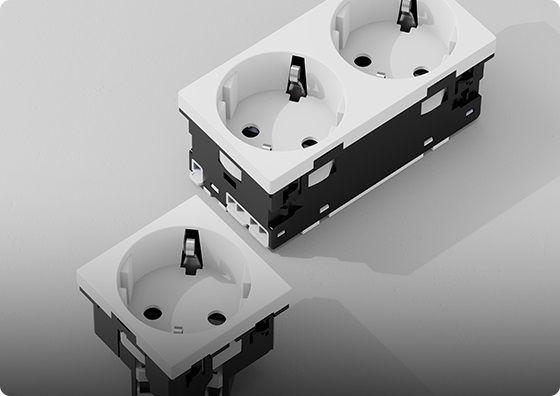
A trunking system is a continuous channel — usually along the desk edge, the table leg, or the wall skirting — that carries power and data cables to pre-engineered positions. The channel accepts standard modular inserts: an AC socket, a data port, or a trunking socket module with USB-A and USB-C charging. In mature systems, the insert clips into the channel without tools, and its terminals connect to the busbar or pre-wired trunk.
Installation Workload Compared
The real difference between the two approaches is how many manual steps repeat per workstation. The table below compares the typical on-site sequence.
| Step | Cable management per workstation | Trunking system per workstation |
|---|---|---|
| Route power cable | Individually from the local supply | Continuous channel; no per-desk cabling |
| Terminate socket on site | Yes, hardwired on site | No; module clips in with quick terminals |
| Mount the socket / charger | Drill, cutout, fix, dress | Clip into the trunking profile |
| Tidy the cable | Tie-wrap, clip, tuck | Already inside the channel |
| Test each point | Test each termination | Test at the trunk head end; module plug-and-play |
| Reconfigure later | Re-run and re-terminate | Move or add a module in minutes |
The Hidden Cost: Time Per Workstation
On a single desk, cable management is genuinely faster. There is no channel to order, cut, and fit, and a competent installer can install a desk charger in under an hour. Trunking wins only when the per-workstation repeated work is removed. On a 20- or 50-desk open-plan project, the same installer no longer terminates 50 individual sockets; they run one continuous trunk, click in the modules, and test once at the head end. The hours saved scale with the number of identical workstations.
The second saving is less visible but matters on fit-outs. When a company reconfigures its office every 18 to 24 months, trunking lets the facilities team move a usb charging module and its neighboring sockets without an electrician, while cable-managed workstations require re-cabling. Over the life of the fit-out, that recurring saving often exceeds the upfront premium.
Flexibility and Reconfiguration
This is where trunking pulls ahead on any project expected to change. In a trunking system, the channel is fixed; the modules inside it are not. Adding a workstation, swapping an AC outlet for a USB-C PD insert, or moving a desk's power position is a clip-in operation. In a cable-managed installation, each change is a small wiring job. For growing teams, co-working spaces, and leasing projects that hand the space over to changing tenants, this flexibility is a direct labor-cost saving over time.
Safety and Maintenance
Trunking also changes the safety picture. Cables are contained in a closed channel rather than clipped under a desk, which reduces trip hazards and accidental damage. For commercial installations, the modules should still meet the same baseline expectations as any embedded usb charging module in furniture — safety aligned with IEC 62368-1, relevant EMC compliance, and a fire-retardant housing. The channel itself is an enclosure; the electronics inside it still need to be rated for unattended commercial use.
Data Cables and Network in the Same Channel
Most office fit-outs need both power and network at every desk. A well-designed trunking system runs the two in separate compartments inside the channel, or in adjacent channels separated by a metal divider. Running power and data cables in the same unsegregated space increases the risk of coupling noise onto network cabling, which shows up as slow connections or dropped links. The channel choice and its compartment layout should be confirmed at the design stage, not after the cable is pulled.
This is another reason cable management per-desk work is more error-prone: the installer makes compartment-by-compartment decisions on site. A trunking system decided in advance runs power and data consistently across every desk, which is one of the quiet savings of the modular approach.
Headend Planning and Circuit Sizing
A trunking system is only as good as the circuit that feeds it. Before modules are specified, the electrical designer should work out how many workstations share one trunk, how much total load that represents, and which consumer unit circuit feeds it. A trunking socket module rated at 65 W is not the same as drawing 65 W at the wall continuously; AC-to-DC efficiency is high, but a dozen such modules on one circuit still add up. An electrician should confirm the circuit rating and the cable cross-section before the trunk is ordered.
The headend also decides where the trunk starts. A clean installation terminates the trunk at a clearly identified junction, labeled for maintenance. Without that label, the first person who needs to isolate the system spends hours tracing cables. This is a one-minute decision at design stage that saves days of maintenance later.
Material Finish and Aesthetics
Beyond labor and load, the visible finish matters. A trunking channel runs along the desk edge or skirting and is visible to anyone in the room. Its color, texture, and profile should match the furniture palette rather than looking like a later addition. Mature trunking systems offer channels in several standard finishes, and the module inserts usually match the channel face. Buying a low-cost channel from one supplier and a mismatched module from another produces a visibly patched result that undermines the whole fit-out.
Cable management, by contrast, is usually hidden under the desk. The material finish is almost invisible to the end user, which is one reason it remains popular in home-office and budget installations. In a client-facing office, hotel lobby, or co-working space, however, the visible run of the channel is part of the design statement, and the buyer should treat finish and color consistency as part of the specification rather than an afterthought.
It is also worth checking how the channel handles corners, joints, and end caps. A cheap channel cuts unevenly at corners and shows visible seams; a better system uses purpose-made corner pieces and end caps that snap on cleanly. These details do not appear on a price comparison, but they are the difference between a professional installation and a DIY look.
Which Should You Choose?
| Situation | Recommended approach |
|---|---|
| Single desk, home office, one-off retrofit | Cable management |
| 4-8 desks, fixed layout, no reconfiguration planned | Either; compare local labor rates |
| 10+ workstations, open-plan office, hotel, co-working | Trunking system |
| Layout expected to change every 12-24 months | Trunking system |
| Public area where cable tidiness is a priority | Trunking system |
| Tightest upfront material budget, small project | Cable management |
Whichever approach is chosen, the module itself still needs to be selected on its own merits: wattage, port mix, certification, and thermal design. For EU-facing projects, look for modules aligned with IEC 62368-1 and the relevant ecodesign requirements such as Regulation (EU) 2019/1782. These apply regardless of whether the electronics sit in a trunking channel or under a desk.
It is also worth asking the contractor which approach they would recommend for the specific site. An experienced installer who has run both cable management and trunking on hundreds of desks can usually predict, from the room layout alone, which approach will be faster and cleaner on the day. Their on-site knowledge often beats a desk-based spreadsheet comparison, because they know which corners, floor obstructions, and access points will turn a theoretical fast install into a slow one.
Summary
Cable management wins on small, one-off jobs because it needs no channel and no modular parts. Trunking systems win on any project with repeated workstations, especially when the layout will change: the on-site termination work disappears, reconfiguration becomes a clip-in operation, and the recurring labor saving compounds over the life of the fit-out. The deciding question is not which product looks better, but how many identical workstations the project has and how often they will move. For projects on the boundary between the two approaches, it is worth installing a single-trunk pilot section first, timing the actual installation, and then extrapolating to the whole floor — a half-day pilot answers the question better than any sales comparison.
The choice between cable management and trunking is not a product endorsement but a project-by-project calculation. A contractor who has done both will usually recommend the same answer the first table of this guide suggests: cable management for small fixed jobs, trunking for repeated workstations and changing layouts. The buyer's job is to know which of those two situations describes their project, and to brief the installer with that context before the quote is written.
Designing a trunking project or office fit-out?
Glob-el designs and manufactures modular trunking socket module hardware for furniture brands and office fit-out contractors. Modules fit standard trunking profiles in 22.5×45 mm, 45×45 mm, 67.5×45 mm and 90×45 mm sizes, from 20 W to 140 W, with CE, CB and VDE alignment and quick terminals designed for fast on-site installation.
Request a Custom QuoteFAQ
What is a trunking system?
A trunking system is a continuous channel that carries power and data cables to modular socket and USB charging inserts. The channel is fixed once; the inserts clip in and can be moved or replaced without re-running cables.
Is trunking really faster than cable management?
On a single desk, no. Cable management is faster for one-off jobs. On 10 or more identical workstations, trunking is usually faster because per-desk termination work disappears and modules plug in instead of being hardwired.
Can trunking be retrofitted into an existing office?
Yes. Surface trunking can be clipped to skirting, desk edges, or under desks without lifting floors. It is a common approach for phased office upgrades where floor penetration is not allowed.
How many charging points can one trunking run support?
It depends on the trunking's cross-section and the total load. As a rule of thumb, plan the circuit load rather than the number of USB ports; a commercial design should be checked by an electrician for the dedicated circuit capacity.
Is trunking more expensive upfront?
Yes, material cost is higher than loose cable management. On medium to large projects, the saved installation labor and cheaper future reconfiguration usually close the gap over the first years of use.
What modules fit a standard trunking profile?
Look for modular inserts in standard grid sizes such as 22.5×45 mm, 45×45 mm, 67.5×45 mm, or 90×45 mm, depending on the trunking system. Confirm compatibility with the chosen channel before ordering.


