


A Complete Guide to Power and Network Solutions for Modern Workspaces

You want your workspace to run smoothly and stay organized. Choosing the right Workspace Power and Network Solutions helps you keep your devices charged and your connections strong. Good planning can save you time and trouble. You need systems that make your work easier and help you prepare for new technology. Smart solutions help you avoid clutter, improve safety, and get ready for the future.
Key Takeaways
Choose the right power modules to keep your workspace organized and efficient. In-desk, under-desk, and on-desk options offer different benefits.
Use fiber optic cabling for faster network speeds and better reliability. It reduces signal loss and protects your data from interference.
Plan your workspace layout carefully. Assess your needs and ensure you have enough power outlets and network connections for future growth.
Implement effective cable management systems. Use trays, raceways, or ducts to keep cables organized and reduce hazards.
Prioritize safety and sustainability. Select products that meet safety certifications and use eco-friendly materials to protect the environment.
Workspace Power and Network Solutions Overview

In-Desk Power Modules
You can choose in-desk power modules if you want easy access to power and data ports right at your fingertips. These modules fit into the surface of your desk. They help you keep your workspace neat by hiding cables and reducing clutter. In-desk modules work well in open-plan offices, hot-desking areas, and collaborative spaces. You can enjoy a modern look and quick access to charging for your devices.
You get power and data ports within arm’s reach.
These modules keep your desk tidy and organized.
They fit many office layouts and support a clean, professional style.
Under-Desk Power Modules
Under-desk power modules mount below your desk. You can use them to keep cables out of sight and free up desk space. These modules are great for fixed workstations and shared desks. Safety is important when you install under-desk modules.
| Safety Feature | Description |
|---|---|
| Surge Protection | Protects devices from voltage spikes. |
| Residual Current Protection | Cuts off current to prevent electric shock. |
| Child Safety Locks | Stops children from accidental access. |
Flame-retardant materials lower fire risk.
Durable contacts improve safety and performance.
On-Desk Power Modules
On-desk power modules sit on top of your desk. You can move them where you need power most. Many modern designs, like EVOline DockSquare, offer modular sockets and cable management. These modules help you keep your workspace tidy and support many devices, such as laptops and phones. Raised Floor Systems also offer flexible solutions for easy access to power and data.
Compare Power Module Types
You should compare power modules based on your needs. Look at performance, battery technology, and upgrade options.
| Criteria | Description |
|---|---|
| Performance | Check if the module meets your device needs. |
| Battery Technology | Choose the right battery type for runtime and maintenance. |
| Hot-Swap Functionality | Useful for busy offices with many users. |
| Robustness | Pick strong modules for tough environments. |
| Upgradeability | Modular parts make future upgrades easier. |
| Service and Support | Good support helps keep your workspace running smoothly. |
Power Module Features
Modern power modules offer many helpful features:
Efficient power delivery for all your devices
Compact design to save space
Support for high power density
Smart power management systems
Multiple supply rails for complex setups
Tip: Choose modules with advanced features to keep your workspace ready for new technology.
Installation and Safety
You must follow safety steps when installing Workspace Power and Network Solutions:
Unplug the power supply before you start.
Make sure the module is grounded for safe electricity flow.
Use non-conductive spacers if your desk has metal parts.
You can keep your workspace safe and organized by following these tips and choosing the right modules.
Network Cabling Trends
Fiber Optic Cabling
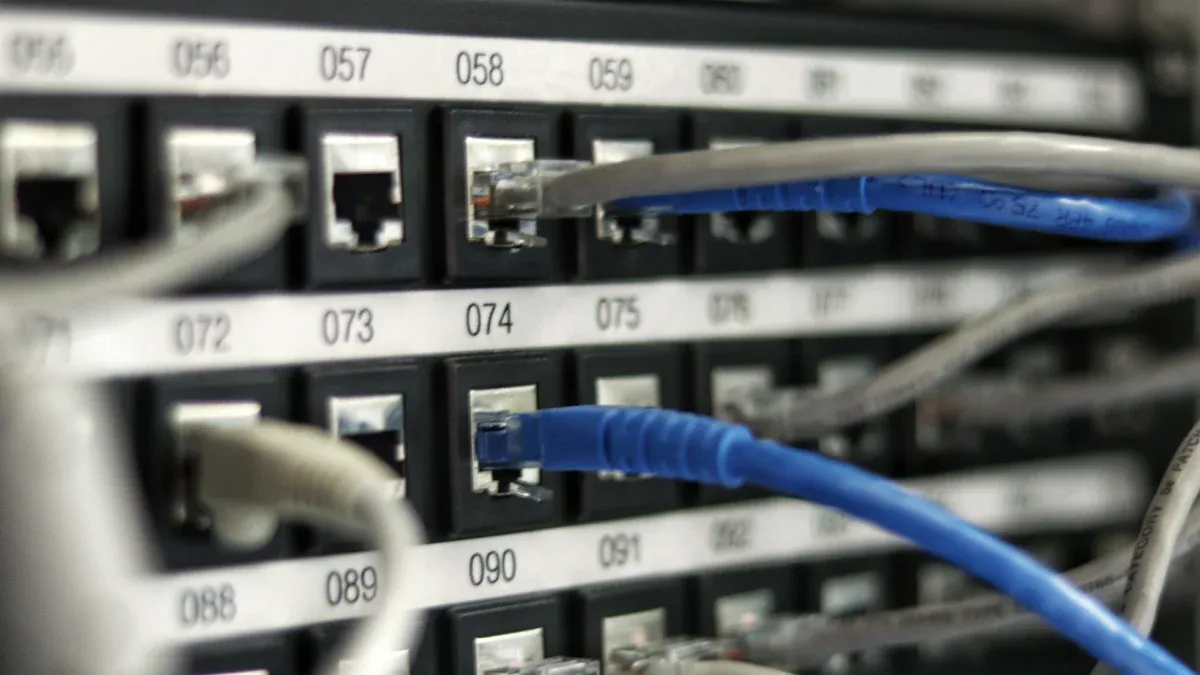
You can boost your network speed and reliability with fiber optic cabling. Fiber optics give you more bandwidth and let you send data over long distances with almost no signal loss. They also keep your network safe from electromagnetic interference and make it harder for others to tap into your data.
| Benefit | Description |
|---|---|
| Expanded bandwidth | Carry more data at once for busy offices. |
| Extended transmission distances | Send data farther without losing quality. |
| Immunity to electromagnetic interference | Avoid errors from outside signals. |
| Electrical isolation | Lower the risk of shocks and fires. |
| Enhanced reliability | Get a strong, steady connection. |
| Improved security | Make your network harder to hack. |
Structured Cabling and IoT
You can use structured cabling to connect smart devices and systems in your workspace. This setup helps you build a smart office that is safe and efficient. When you plan your cabling well, you make it easier to add new technology and boost teamwork.
Connect lights, sensors, and security systems.
Make your workspace ready for future upgrades.
Improve energy use and comfort.
High-Speed Ethernet
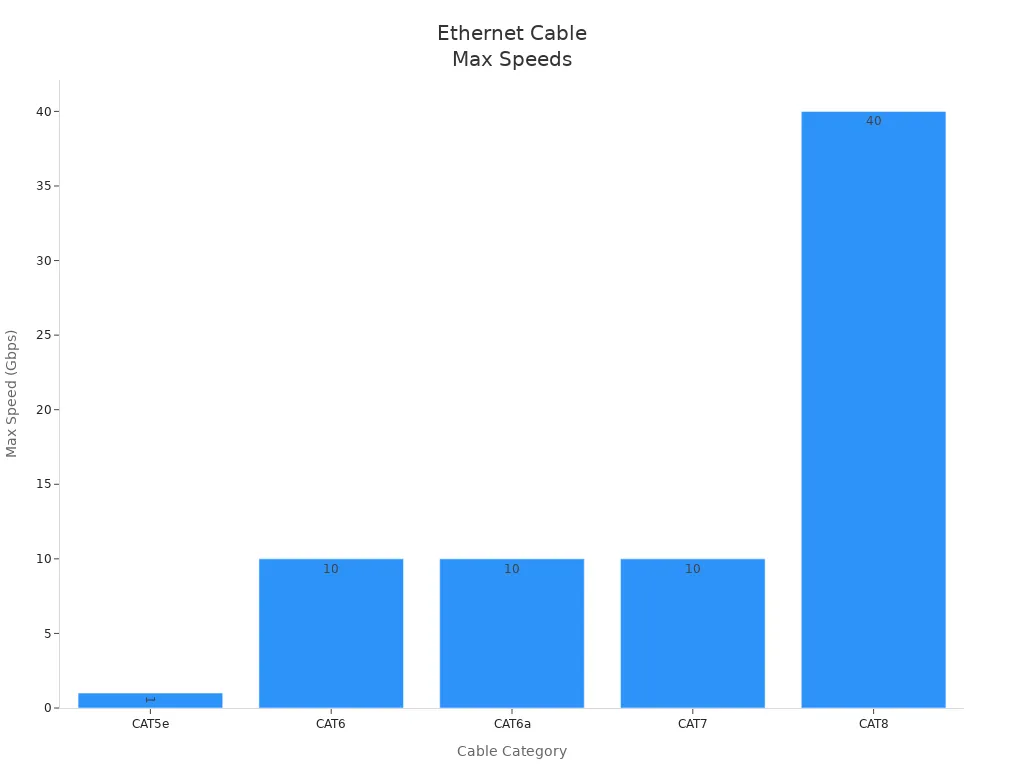
High-speed Ethernet gives you fast and steady connections. You can use cables like CAT6a or CAT8 to reach speeds up to 40 Gbps. This means you can move large files quickly and keep video calls clear.
Lower latency means less waiting.
Wired links keep your data safe and steady.
Power over Ethernet (PoE)
You can power devices like cameras and phones with PoE. This lets you send power and data through one cable. You save time and money because you do not need extra power outlets.
Sustainable Cabling
You help the planet by choosing eco-friendly cables and energy-saving setups. Many companies now use green materials and smart designs to cut waste and lower energy use.
Wired and Wireless Integration
You get the best of both worlds when you mix wired and wireless networks. Wired connections give you speed and safety. Wireless lets you move around and connect more devices. This mix supports all your Workspace Power and Network Solutions.
AI Monitoring and Security
AI tools can watch your network and spot problems fast. They can fix issues before you notice them. AI also helps keep your data safe by blocking threats and following security rules.
| Evidence Description | Role in Network Security |
|---|---|
| AI enables advanced analytics | Enhances operational efficiency and proactive issue resolution. |
| AI algorithms analyze historical data | Helps in identifying abnormal behavior patterns and potential threats. |
| AI-driven automation | Reduces manual intervention and minimizes downtime, improving overall security posture. |
| Robust security features | Strengthens defenses against cyber threats and ensures adherence to regulatory requirements (RBAC, MFA). |
Future-Proofing Networks
You can future-proof your network by using managed switches and AI-based solutions. These tools help your network grow and change as your needs do. You stay ready for new technology and keep your workspace running smoothly.
Cable Management Systems
Bench Trunking Challenges
You may see bench trunking in older offices. This system hides cables inside metal or plastic channels under benches. Bench trunking can make upgrades hard. You might struggle to add new cables or change layouts. Cleaning and maintenance take more time. Bench trunking often costs more because you need skilled workers for installation.
Cable Trays
Cable trays help you organize cables above ceilings or along walls. You can access cables easily for repairs or upgrades. Cable trays work well in large workspaces. You save time during installation. You also lower costs because you do not need special tools. Cable trays use fire-resistant materials to improve safety.
Cable Raceways
Cable raceways run along walls or floors. You can hide cables and keep your workspace neat. Raceways protect cables from damage. You install them quickly and move them if you change your office layout. Raceways cost less than bench trunking. You can choose different sizes for your needs.
Wire Ducts
Wire ducts keep cables separated and organized. You use wire ducts in server rooms or places with many devices. Wire ducts make it easy to trace cables and fix problems. You can expand your system without much trouble. Wire ducts use strong materials to prevent wear and tear.
Compare Cable Management Options
| System | Cost | Space Use | Installation Difficulty | Flexibility | Safety Features |
|---|---|---|---|---|---|
| Bench Trunking | High | Medium | Hard | Low | Good |
| Cable Tray | Medium | High | Easy | High | Fire-resistant |
| Cable Raceway | Low | Medium | Easy | High | Protective casing |
| Wire Duct | Medium | Low | Medium | Medium | Durable materials |
You can also use cable sleeves and cable spirals for large workspaces. Cable sleeves stretch to fit many cables and keep them together. Cable spirals protect cables from damage and wear.
Tip:Streamlined cable management reduces confusion and accidental disconnections. You get faster maintenance and less downtime. Organized expansion lets you add new equipment easily. Clean workspaces lower trip hazards.
Proper cable management supports Workspace Power and Network Solutions. You improve fire safety, minimize electrical hazards, and ensure compliance with standards like BS 7671 and BS EN 61537.
Choosing Workspace Power and Network Solutions
Assess Workspace Needs
You need to start by understanding what your workspace requires. Every office is different. You should look at your current setup and think about what you want to improve. Here are some important steps to help you assess your needs:
Check if your building has fiber or high-speed internet available.
Make sure you have power circuits just for your IT equipment.
Look at the ceiling and walls to see if you can run new cables.
See if you have space for a server rack or a small server room.
Check if your IT areas have good cooling and ventilation.
Find out if you have backup power, like a UPS or generator.
Decide where you will put access points, cameras, and network outlets.
Ask your landlord if you can make changes, like drilling or adding wires.
Get your IT vendor’s written approval before you sign a lease.
You should also plan your workspace layout before you install anything:
Map out every desk, meeting room, printer, and camera location.
Place network and power outlets next to each workstation.
Add extra outlets for Wi-Fi and smart devices.
Plan for 20–30% more outlets and switch ports than you need now.
Keep outlets away from water, heat, or heavy electrical lines.
Label every outlet and keep a record in a shared file.
If you have devices that must stay on during a power outage, pick a UPS that can handle at least 25–30% more than your total power needs. Test your UPS batteries every year to make sure they work.
Tip: Careful planning now helps you avoid costly changes later.
Balance Aesthetics and Performance
You want your workspace to look good and work well. A smart design gives you both. Place workstations and technology in ways that meet safety and technical standards. At the same time, you can create a space that feels open and inspires your team. Good design helps people work together and keeps your office looking modern.
You can hide cables and use sleek power modules to keep your workspace tidy. Choose colors and finishes that match your brand. When you balance looks and performance, you make your workspace a place where people want to work.
Ensure Safety and Sustainability
Safety and sustainability matter in every workspace. You should choose products and systems that meet top certifications. These certifications show that your workspace is safe, energy-efficient, and good for the environment.
| Certification Name | Description | Reference |
|---|---|---|
| ISO 45001 | Occupational health and safety management | View PDF |
| ISO 50001 | Energy management systems | View PDF |
| ISO 9001 | Quality management systems | View PDF |
| ISO 14001 | Environmental management systems | View PDF |
| Safety Culture Ladder (SCL) Level 4 | Advanced safety culture in construction | View PDF |
| Safety Culture Ladder (SCL) Level 3 | Safety culture in mobile mast construction | View PDF |
You can also help the planet by picking eco-friendly cables and energy-saving devices. Look for products that use less energy and last longer. This saves money and reduces waste.
Note: Safety and sustainability protect your team and the environment.
Steps to Future-Proofing
You want your workspace to grow with your business. Future-proofing means you get ready for new technology and more people. Here are some steps you can take:
Invest in scalable cabling solutions. This lets you add more devices later without starting over.
Use a strong network cabling system. This keeps your data safe and reduces risks.
Choose structured cabling systems. These make upgrades and repairs easier.
Plan for extra outlets and ports. This helps you handle new equipment as your needs change.
You should review your Workspace Power and Network Solutions every year. Check if your setup still meets your needs. Update your plan as your business grows.
Callout: Planning for the future saves you time and money. You avoid big changes and keep your workspace running smoothly.
You have learned how to choose power modules, network cabling, and cable management systems for your workspace. You can improve safety, organization, and performance by picking the right solutions.
Review your current setup and spot areas for improvement.
Plan for future growth and technology changes.
Select products that support sustainability and easy upgrades.
Tip: Regularly check your workspace systems to keep them efficient and ready for new demands.
FAQ
What is the best way to keep cables organized in my workspace?
You can use cable trays, raceways, or wire ducts. These tools help you group cables and keep them neat. Label each cable for easy tracking. Organized cables lower the risk of accidents.
How do I choose the right power module for my desk?
Check how many devices you use daily. Pick a module with enough outlets and USB ports. Look for safety features like surge protection. Choose a design that fits your desk style.
Can I upgrade my network easily in the future?
Yes, you can. Use structured cabling and modular systems. Plan for extra ports and outlets. Review your setup every year. This makes upgrades simple and keeps your workspace ready for new technology.
Are eco-friendly cables as reliable as regular ones?
Eco-friendly cables work just as well as regular cables. They use safe materials and last a long time. You help the environment and keep your network strong.
Please Contact Us!


Recent News
1.New Custom USB-C Charging Module Powers Innovative Retail Display System for the Mobile Phone Store
2025-08-122.Efficient Empowerment: New 100W Dual Type-C Power Module Launches, Empowering Global OEM Customers with Innovation and Upgrades
2025-08-133.USB: The Bridge Connecting the Past and the Future
2025-09-23


