B2B OEM Technical Guide Desktop Embedded Sockets for Furniture OEMs: USB-C, GaN, Installation, and Procurement ChecklistPublished: March 2, 2026 | Last Updated: May 21, 2026 |
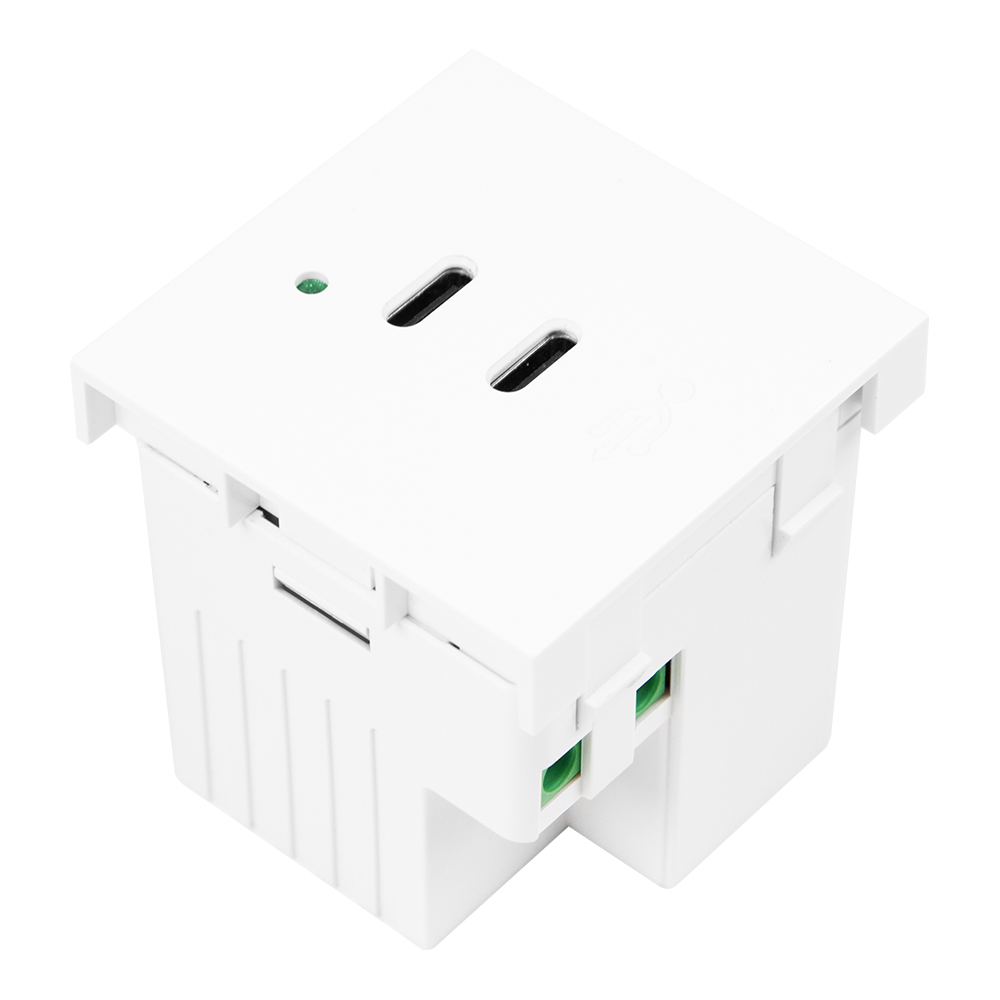
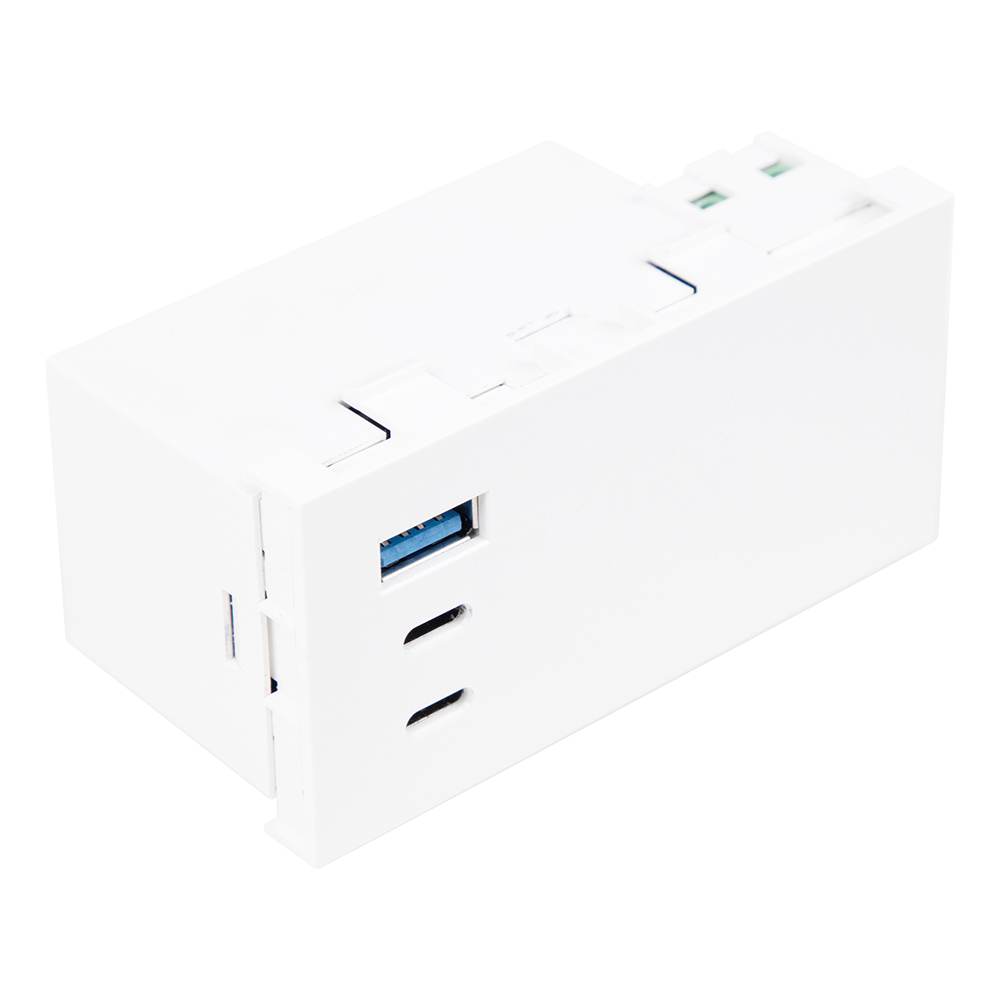
Desktop embedded sockets are no longer treated as simple desk accessories in many office, hotel, education, and commercial furniture projects. For furniture OEMs, project buyers, distributors, and technical purchasing teams, the real sourcing question is whether the selected module fits the furniture design, supports the required charging configuration, and comes with documentation that matches the target market and installation environment. In this guide, "desktop embedded sockets" refers to power modules, flush-mounted sockets, USB charging units, USB-C charging modules, and mixed AC/USB/data access points designed for integration into desks, benches, counters, conference tables, and similar furniture surfaces. It is a business and procurement category in this article, not a formal regulatory product class. This article is a technical purchasing guide, not legal or installation advice. Buyer Intent: What OEM Teams Need To DecideMost buyers arrive at this topic when they need to approve a desk power module before sampling, RFQ confirmation, or furniture production. A useful evaluation should answer six questions: what cutout does the module require, how much mounting depth is needed, whether the port configuration matches the user scenario, whether USB-C PD or GaN claims are documented, whether CE / ENEC / RoHS / EMC evidence is available for the model, and whether the supplier can support stable production over the project lifecycle. The safest procurement approach is to separate mechanical fit, electrical configuration, compliance documentation, and supplier reliability. A module that looks suitable on a catalog page may still fail the project if the cutout tolerance is unclear, cable exit conflicts with the desk frame, USB-C power sharing is misunderstood, or compliance documents refer to a different model variant. What Is a Desktop Embedded Socket?A desktop embedded socket is a fixed power access module installed into a furniture surface. Depending on configuration, it may include AC sockets, USB-A ports, USB-C ports, data ports, switches, wireless charging surfaces, or cable pass-through features. Unlike loose power strips, embedded modules are usually specified during furniture design because their cutout, panel thickness range, underside clearance, cable routing, and service access affect the finished product. Common furniture applications include office desks, workbenches, reception counters, training tables, conference tables, hotel furniture, and public workspace systems. In each case, the module should be evaluated as part of the furniture system, not only as a standalone electrical accessory. Quick Selection SummaryDesktop embedded socket selection summary for furniture OEM buyers| Selection Area | What Buyers Should Check | Common Risk |
|---|
| Mechanical fit | Cutout size, panel thickness, mounting depth, fixing method, cable exit direction. | Panel drawings are approved before the exact module drawing is confirmed. | | Power and charging configuration | AC socket type, USB-A / USB-C mix, PD revision, rated output, power-sharing behavior. | Catalog wattage is treated as per-port output under every load condition. | | Thermal and installation environment | Under-surface clearance, enclosed space, airflow, sustained load, surrounding material. | Bench testing is assumed to represent an enclosed furniture installation. | | Compliance documentation | CE declaration, technical documentation evidence, EMC / LVD / RoHS-related documentation where applicable, ENEC certificate if claimed. | Supplier sends a generic certificate that does not match the quoted model. | | Supplier readiness | Sample approval process, drawing control, batch consistency, lead time, change notification. | Production starts before document gaps and variant differences are resolved. | Module Types: Square, Round, Pop-Up, Flip-Up, and Flush-Mount OptionsFurniture teams often compare embedded socket modules by visible shape first, but the more important decision is whether the module format supports the required ports, installation sequence, service access, and desk structure. Square or rectangular modules usually provide more room for mixed AC and USB layouts. Round modules may be easier to integrate into smaller surfaces. Pop-up and flip-up designs can protect ports when not in use but require more careful review of moving parts, cable strain, and long-term durability. Common desktop embedded socket formats| Format | Typical Use | Procurement Checkpoint |
|---|
| Square / rectangular flush module | Workstations, conference tables, and mixed AC/USB requirements. | Check cutout tolerance, underside depth, cable outlet, and socket-country variant. | | Round module | Compact desks, benches, counters, USB-only or simple AC/USB layouts. | Confirm diameter, locking method, panel thickness, and available port mix. | | Pop-up module | Meeting tables where ports should be hidden when not in use. | Review lifting mechanism, service access, cable bend radius, and durability evidence. | | Flip-up / cover module | Project desks requiring a clean surface and protected ports. | Check cover clearance, hinge durability, spill exposure risk, and cleaning requirements. | Cutout, Panel Thickness, and Mounting Depth RequirementsCutout dimensions should be taken from the exact supplier drawing, not estimated from a product photo. Early planning examples may refer to rectangular modules around 150 x 70 mm, round USB modules around 60 mm, and larger round AC/USB variants around 80 mm. These figures are useful for early planning, but they should never replace the model-specific installation drawing. Furniture teams should lock panel drawings only after the supplier confirms tolerance, corner radius, fixing method, and underside body size. Mounting depth is equally important. The module body, cable exit, strain relief, connector, and bend radius may require more space than the visible top plate suggests. A desk frame, cable tray, modesty panel, drawer, or metal support rail can interfere with the module even when the top cutout is correct. Before sampling, engineering teams should review the underside assembly model and confirm whether installation can happen before or after furniture assembly. USB-C PD, GaN, and Power-Sharing ConsiderationsUSB-C Power Delivery should be evaluated by documented implementation, not by front-panel labeling alone. USB-IF information on USB Power Delivery explains the role of USB PD in higher-power USB-C charging, while the USB Power Delivery specification library provides the formal technical context. For procurement, buyers should ask the supplier which PD revision is implemented, what maximum output is available, whether the product uses Standard Power Range or Extended Power Range, and how output changes when multiple ports are loaded at the same time. GaN should be treated as a component or power-conversion technology claim, not as a standalone compliance mark. A compact GaN-based module may support higher power density, but the buyer still needs product-specific evidence for safety, EMC, thermal behavior, enclosure construction, and sustained operation. If a supplier promotes a GaN desktop module or USB charging module, ask for the module datasheet, test summary, rated output, operating temperature range, and whether the quoted model has the same internal design as the tested model. For PD-capable products, buyers may also request USB-IF compliance or test evidence where relevant. USB-IF USB-C compliance resources can support this conversation, but USB-IF testing does not replace EU market documentation such as CE, EMC, LVD, RoHS, or model-specific safety evidence. Source and Verification NotesFor European projects, CE marking, technical documentation, Declaration of Conformity, EMC, LVD, RoHS-related documentation where applicable, and ENEC should be discussed separately. European Commission CE marking guidance explains CE marking as a market-access conformity signal for covered products. Buyers should request the EU Declaration of Conformity and check whether the model, legislation, standards, signatory, and date match the product being quoted. The supplier should also be able to explain what technical documentation supports the declaration. The European Commission provides guidance on technical documentation and the EU Declaration of Conformity. Buyers do not necessarily need the supplier's full technical file, but they should verify that a document trail exists and that model references match the RFQ item. For related purchasing resources, buyers can also review GLOB-EL Technical Support. For electrical accessories and charging modules, buyers should also review whether Low Voltage Directive, EMC Directive, safety evidence, and RoHS-related documentation may apply to the exact product and target market. If ENEC is claimed, verify it as a voluntary third-party certification signal through the certificate scope and issuing body. ETICS ENEC information and the ETICS ENEC brochure can help buyers understand the scheme, but the actual certificate must still match the model under review. Procurement Fact Table: What Buyers Should VerifyVerification evidence for desktop embedded socket procurement| Topic | Evidence To Request | Risk If Missing |
|---|
| Cutout and mounting | Installation drawing, tolerance, panel thickness range, underside depth, cable exit direction. | Furniture panel or frame conflicts appear after tooling or sampling. | | USB-C PD | PD revision, rated output, power-sharing logic, cable requirements, compliance/test evidence if claimed. | Buyer assumes all ports deliver maximum wattage under simultaneous load. | | GaN | Product datasheet, internal architecture statement if available, thermal test summary, rated operating conditions. | Small size is mistaken for verified thermal or compliance performance. | | CE documentation | EU Declaration of Conformity, technical documentation evidence, applicable directives/standards, model traceability. | Generic CE wording is accepted without model-specific support. | | ENEC claim | Certificate number, issuing body, model scope, validity, covered standards. | Third-party certification is assumed for variants not covered by the certificate. | | Production readiness | Sample approval criteria, batch tolerance control, lead time, change notification, replacement plan. | Product changes occur during furniture production without buyer approval. | Technical Comparison MatrixDesktop embedded socket format comparison for OEM furniture projects| Dimension | Square / Rectangular Flush Module | Round Module | Pop-Up or Flip-Up Module |
|---|
| Best suited for | Full workstations, conference tables, and mixed AC/USB requirements. | Compact desks, benches, and minimalist surfaces. | Meeting rooms or premium furniture where ports should be hidden. | | Mechanical review | Rectangular cutout, corner radius, under-surface body, and fixing points. | Diameter, locking ring or clip, panel thickness, and clearance. | Movement path, cover clearance, mechanism durability, and cable strain. | | Electrical review | AC socket mix, USB-C PD output, earthing, cable outlet, and country variant. | USB-only or simple AC/USB layout, rated current, and compact thermal behavior. | Same electrical checks plus moving-part and cable-routing impact. | | Procurement risk | More variants can create document mismatch across socket type or faceplate versions. | Small body size may limit thermal or port options. | Mechanical durability and service access may be underestimated. | | Documents to request | Drawing, datasheet, DoC, test reports, certificate scope if claimed. | Drawing, datasheet, output rating, thermal evidence, DoC. | Drawing, mechanism test evidence, datasheet, DoC, service instructions. | OEM Procurement Checklist Before RFQ or SamplingConfirm the target market, plug type, socket standard, and installation environment. Request the exact model code and variant list for the quoted module. Obtain the installation drawing before finalizing the furniture cutout. Check cutout dimensions, corner radius, panel thickness, underside depth, and cable exit direction. Confirm USB-A / USB-C mix, PD revision, rated output, and multi-port power-sharing behavior. If GaN is claimed, request product-specific datasheet and thermal evidence rather than accepting the term as a compliance mark. Request the EU Declaration of Conformity and verify model references, legislation, standards, issue date, and signatory. Ask which EMC, LVD, safety, RoHS-related documents where applicable, and other test evidence support the model. If ENEC is claimed, request certificate number, issuing body, validity, and covered model scope. Confirm sample approval criteria, batch tolerance control, lead time, and change notification process. Record unresolved documentation gaps before sample approval. Do not approve mass production until the RFQ configuration, sample configuration, and document package align.
Supplier Red FlagsDatasheets list wattage or PD features but do not identify PD revision or power-sharing behavior. Cutout drawings are missing, inconsistent, or not tied to the quoted model code. Certificates or declarations refer to a different model, product family, or older configuration. Supplier uses broad language such as "CE/ENEC available" without document scope. GaN is used as a marketing label without thermal or electrical evidence for the exact module. Supplier cannot explain cable exit, strain relief, mounting depth, or service access. Sample approval is informal and does not document pass/fail criteria. Supplier refuses to confirm whether future component or firmware changes will be reported.
When Not To Use a Desktop Embedded SocketA desktop embedded socket may not be the right choice if the furniture design cannot provide enough underside clearance, if the panel material cannot hold the mounting system securely, if the environment exposes the module to moisture or heavy cleaning without suitable design protection, or if the customer requires certification evidence that the supplier cannot provide for the exact model. In those cases, buyers should consider a different power access format or request an engineering review before tooling. For high-density charging, USB-C PD, or compact GaN-based configurations, buyers should pay special attention to thermal behavior and sustained load conditions. The module should be reviewed in the context of the final furniture installation rather than only as a standalone product. Frequently Asked QuestionsWhat is a desktop embedded socket?A desktop embedded socket is a furniture-integrated power access module installed into a desk, counter, bench, or table surface. It may include AC sockets, USB-A, USB-C, data ports, switches, or mixed power and charging features. | What cutout size should an OEM specify?The OEM should use the model-specific installation drawing from the supplier. Example dimensions may help early planning, but the final cutout, tolerance, and corner radius should come from the exact module drawing. | How much mounting depth is needed?Mounting depth depends on module body size, connector type, cable exit, strain relief, and bend radius. Buyers should check underside clearance against the desk frame, cable tray, drawers, and other hardware before approving the design. | When should buyers choose square vs round modules?Square or rectangular modules are usually better for mixed AC and USB layouts or larger workstation surfaces. Round modules can suit compact desks, benches, and simple USB or AC/USB configurations. The best choice depends on port count, available space, and installation method. | Are USB-C PD and GaN modules suitable for furniture?They can be suitable when the module is properly documented for the intended configuration and installation environment. Buyers should verify PD revision, rated output, power sharing, thermal behavior, and relevant compliance evidence before approval. | Does CE marking prove independent certification?No. CE marking should not be treated as the same as third-party certification. Buyers should request the Declaration of Conformity and supporting documentation, then verify that the model and applicable legislation match the product being sourced. | When should ENEC documentation be requested?ENEC documentation should be requested when the supplier claims ENEC coverage, when the end customer asks for third-party certification evidence, or when the project risk profile justifies additional safety certification review. The certificate scope must match the exact model. | What documents should buyers request before sampling?Buyers should request the model datasheet, installation drawing, EU Declaration of Conformity, relevant test reports, USB-C PD or GaN evidence if claimed, certificate scope if ENEC is claimed, and a sample approval checklist. | What are common supplier red flags?Common red flags include missing drawings, vague CE/ENEC claims, unclear PD output, no thermal evidence for compact high-power modules, mismatched certificates, and no documented sample approval process. | What information should buyers send to GLOB-EL before RFQ?Buyers should send the target market, socket standard, module shape, required ports, USB-C output expectations, installation drawing or panel thickness, expected order quantity, documentation requirements, and any end-customer compliance checklist. This helps GLOB-EL review the OEM configuration and identify documentation questions before sampling. |
Request a Desktop Socket OEM Configuration ReviewFor furniture projects using desktop embedded sockets, USB-C charging modules, or mixed AC/USB power access points, buyers can send the target market, port configuration, cutout requirement, panel thickness, installation environment, expected quantity, and required documentation scope. GLOB-EL can help review the OEM configuration and identify questions to resolve before RFQ confirmation, sampling, or mass production. Request OEM Configuration Review |
|